
:+: Welcome page / Front door :+:
Straitjacket optional 🤪
Abandon all hope, ye who enter here . . . of leaving sane! Mu-ha-ha-ha-ha-ha! Just kidding! I have no intent on causing you any kind of harm, and, in fact, spend a lot of my time trying to help others and make the world a better place! 😇
It's a pity that others won't do the same, but, most of them are human, so . . .
🚨 Important: Something you need to know!: America is now essentially an oligarchy (ruled by the richest) with an authoritarian leadership. Although many will try to deny this, the proof is easy to spot, especially as the leadership engages in many of the same tactics those in the past have used!
Have doubts? Compare America with what's on the Authoritarian Checklist page!
And, there's proof that America is an oligarchy!
It's also important to remember that not everyone in an authoritarian regime should be blamed for what the leaders do. Many of those who live in such a country do not want their leader to be their leader, as they are the source of much of their frustration, emotional pain, poverty and lack of freedom or rights! The problem is the leader, those who blindly follow them, who obey their orders without questioning them or wondering if they're right or wrong. And, those who voted for them and still insist that their leader is perfect in every way, when, to most of the rest of the world, he's seen as a threat to not only his own people but possibly them, as well!
⚡🔗 This page's quick links AKA table of contents:
Yes, I need to move some of this stuff to other pages! Always making more work for myself, using this page as a staging area . . .
But, in the meantime, I've organised it better by putting this near the top of the page!🙌🎇🎉🎊🥳😀 (Celebrating even the 'little wins' these days!)
I'm Different. Very different. So, yes, it's not just this Web site that's different, it's also the author. 🤪
My current battle, soon to escalate!
First off: A few quick things you should know!
Tell others about this Web site.
A quick intro of this Website.
Things I do to try to help others and the world.
Things I used to do to help others.
Site changes and (maybe) future plans.
It may be time for me to give up . . .
Choose your entrance. A short list of other pages on this site.
🔎☛
Just a FYI , I'm different. How different? Very different!
How can I put this in a way that everyone can understand? Well, you've probably heard the phrase
Oh. The other things I can do, the different ideas and values that I have that are different from others? Maybe you'll figure it out, but, by reading even just this page, you'll learn some of that.
〽️ New stuff!
🤩Newest page: Climate Change AKA Climate Breakdown Facts with Details that you can give out to someone the next time they try to argue with you about it! Maybe it'll help humans see reason?🥺 Okay, probably not . . .😣
New trivia game: Created a simple 10-question quiz! Click to try it: CyberWoLman's Quiz! Is it odd? Probably. But, you're used to that from me, right? 🤣
YouTube video: Click to watch: The flying werewolf tour of the SG base I made in the City of Heroes game to help new players! Currently (as of April, 2025) one of the most popular videos on my YouTube channel! Tried to make it funny, but, I was severely sleep-deprived when I did it, so . . . The base's portals to other zones includes level ranges, so the new players don't get a nasty surprise. The game can also be played on Linux! 🐧 🖥️ It's also free (not even microtransactions) and has low system requirements, so it can be played on older computers!
YouTube video: Click to watch: Belly dancers at a Renaissance festival! Just one of the many videos I took at Renaissance fairs AKA ren faires.
YouTube video: Click to watch: Superhero Wedding gone HORRIBLY wrong! City of Heroes MMO game. No bouquet! Full Length! Taken during the Spring Fling event. Disabled the UI so there's no numbers over the characters, just pretty effects and gameplay sound effects. The character I'm playing in this video is a Robotics/Traps mastermind. More details about it and the archetype are included in the video's description for the curious.
YouTube video: Click to watch: Relax with Levitating Werewolf, peaceful background, floating over a pool! Something serene and peaceful in mild sunlight with faint wind chimes gentle water sound as if the water is very small waves lapping on a beach with very faint bird chirping to have playing in the background while you're trying to relax.
YouTube video: Click to watch: It's Raining Men! MC Escher Inspired.! Another one of my . . . odd skills is learning ways to do things others haven't yet! (And, quite frequently, I have to resort to building things nobody else but me seems to think of (or need?) as they're unavailable at any price in the real world, such as an inexpensive movable Murphy bed so I'd have more room!) In this case, I captured a giant monster ghost called Ghost of Scrapyard (not shown in this video but he is in another video on my YouTube channel) in-game, locked him in the highest tower (technically, the highest factory smokestack) and his followers couldn't get to him! Er, and this might not be reproducible, but, if you want to try, it's best to do it on the beta shard or some GM (game master, as opposed to giant monster) might get upset! Although I feel fairly certain that some of the devs in the City of Heroes game know that I do certain things like this (one of the more obvious is my alien character that actually talks like an extraterrestrial alien in the game), I absolutely refuse to list them! I get into enough trouble, as it is . . .
Also cleaned up some of the stuff on this Web page, putting it on other Web pages. That should make reading this page easier. 😄 Also fixed the links to the TheREALCyberWoLfman channel on YouTube (I had left out the 'at' symbol)! Ack!
🔥 Coming soon! 🔥
🔥 Foreshadowing of one of the next videos on my YouTube channel: Older pinball machines!
🎥 Want to be informed of when the videos go up? You need to subscribe to TheREALCyberWoLfman channel on YouTube!
Already in the process of organising the raw videos I've taken and I've taught myself more video-editing techniques (as opposed to just posting the full raw videos on another account) so you don't have to watch several minutes of me doing nothing until someone shows up in an exam room or while I'm waiting in line. 💤
Update: The first video regarding
💥 My current battle, soon to escalate! 💥
➢
🚨 ⚠ Notice: The information on my struggle to get even basic healthcare and a copy of my medical records (which I've been trying to do since 2012) despite those involved not complying with federal law (specifically
First off:
⚠ Just a few things you should know about me: ⚠
➢ First: The essential philosophy I try to follow is summed up rather nicely by the sign I had placed in the 3D world I made called This Is It AKA ThisIsIt, in front of the virtual campus I created in it called the Knowledge Infusion/Enhancement Matrix: If you take, but do not give, learn, but do not teach, you suck!
➢ Second: If you allow your greed, hatred and prejudices to over-ride your morality, what is it that differentiates you from any other animal? The fact that you collect luxury items and destroy the world for coloured pieces of paper that have no real value (
➢ Third: Do you accept what other people tell you in the real world or on-line as the truth without verifying it for yourself? You're essentially allowing them to dictate what you believe and are little more than a slave. Get the facts for yourself. Learning how to learn is a good skill to have. And, while you're about it, teach others how, too! 👍
Addendum to the third one: Certain personality types, like those considered anti-social (which include psychopaths, sociopaths and narcissists), use tactics such as triangulation to deflect your attention away from something bad that they're doing onto someone else. The person could be there with them in the real world or on-line or could be elsewhere. In the latter case, you're told something about someone that probably isn't true and they believe you're gullible and/or stupid enough to accept their word for it, allowing them to control what you believe. If you find out that it's a lie, they'll laugh it off, claiming it was "just a joke" or somesuch or try some other form of deflection. Besides, what kind of value do you place on someone who's simply trying to hurt other people's reputation or feelings? Your answer to that should be zero. Ignore what they say and move on. Their words, opinion and very existence is meaningless to you and it's likely that many other people already '
➢ Fourth: I engage in video and audio
If you're in a situation or a place where surveillance is obviously being done or is possible and someone gets flustered about you using video and/or audio recording or insist that you ask, first, it's a good bet you're about to be robbed, screwed over, insulted, hurt or possibly killed or a combination of all five. (Did the hypocrites ask you if they could put you under surveillance? Don't be the naive and gullible idiot who expects fairness from someone who isn't fair!)
One of the most infamous examples of this hypocritical behaviour is the McVeillance incident involving Steve Mann. But, let's face it, the true nature of humans is to be cruel, sadistic, power-hungry, hypocritical and greedy arsworms, as anyone can verify when they see what they do when they're in a situation where they can gain power or money or engage in their natural sadistic urges and not have any consequences for their actions. Or, simply
Addendum to the fourth one: If you're an employee who's screwing over or lying to a customer or patient and you try relying on the superior orders excuse or claim you're just following orders, remember who else in history tried using that as an excuse to not have to worry about things like right and wrong . . . the nazis! Are you truly okay with having their same moral code or being seen as emulating them? Do your parents, neighbours, fellow employees and the school you graduated from know this about you? If not, they should be informed of it! For those who think such information is difficult to find (the genuine or bespoke information and not garbage created to get money out of suckers) or even learning who they are by just doing simple things like digging up criminal and civil case files, employment records, marriage licenses, school records, birth certificates, property records and so on, think again! LOL Those who know how to do this kind of thing don't even need your first or last name and can find out who you are with various serarch criteria, refining it to the point where you're caught like a single fish swimming in a school of fishes!
This site is unique and likely seen as old-school. It's considered by some to be a Web 1.0 site (Web version 1?), is coded using nothing but a text editor, so there's variety and all the pages don't look the same, there's not a single ad or anything for sale here, it's practically littered with help pages and this is one of the few remaining examples of what the Web used to look like.
How many Web sites can say the same? So, please give out this Web site's URL or link back to it, if you appreciate that sort of thing. 🥰
➢ Where you can sometimes find me: Although it's probably addictive and seen by many as a waste of time, I like to play the old City of Heroes game (but, they're frequently adding new things to it), which is now free to play on City of Heroes Homecoming. More information here: City of Heroes Homecoming Server New Player Tips. Some of my characters are named CLiMaTe BReAkDoWn, GrEEd KiLLeD EaRtH and Do The Right Thing in my usual futile attempt to help make the world a better place by teaching people, but . . . it's probably a waste of time for me, because, along with many of my other help pages (like the one I made about Climate Change AKA Climate Breakdown, Sea Level Rise, Global Warming and Fossil Fuels), few people read the names and think about the problem and even fewer care.
😎 To make it easier for mobile device users, I've made this Web site rechable via a Web browser capable of using emojis as a URL (the Opera Web browser is one of them)!
However . . . This no longer appears to be working, even in the Opera Web browser! One of these centuries, they'll make things that work they way they're supposed to and build them to last! Oh, who am I kidding? That'll never happen!
You simply put one of the following sets of emojis (they look different for different operating systems or the app or program you're using) in the address bar AKA address field of the Web browser (hold your mouse over each of the following emojis to see the name which each emoji can be found with by doing a search on your smartphone or tablet, unless they're in your recent emojis section):
The first set of emojis makes more sense if you can remember the name of this Web site:
Easier than typing in cyberwolfman.com, for some people, at least? 😉
I'm thankful I never used a
Tell Others
Please share this site with others?
* Important note: Regarding the Covid19 pandemic, I tell you how it spreads in a way that isn't known to the general public, and I provide information to show it's true!
You're welcome. 😁 But, remember to tell others (or, just give out the page links you like), to help them, too!
An Introduction:
✔ You've found the real Cyberwolfman and yes, that's my real name and legal name. Some of the other cyberwolfmen you may have seen on the Internet aren't me.
Look at the world today. See the harm greed's done to the environment and to people around the world and ask yourself if that's a good thing or a bad thing and act accordingly. If you don't do anything, then who will? The corporations or the politicians (who are supposed to serve the people, but, many of them are owned by the corporations)?
How's that worked out for the entire planet the last few decades?
I have a very strong moral code, although I feel as if I'm nearly alone in that . . . But, I've lived through a lot, read a lot and had . . . rather unique experiences in my life and suffered more than many who live in my area and all of that has made me different. How different? I'm more different on the inside than on the outside, which is saying something. You can blame humans for that.
Now that most of the worst people have gone to another Web site . . .
If you read the entirety of even this front door page, you're likely to learn things that most people never will. Be prepared. I haven't been considered normal since the day I was born and never felt like I fit in anywhere and this site and my views reflect that.
And, now, there are even fewer people continuing to read. 🙌 🎇 🎉 🎊 🥳 😀 This was by intention. Few people would understand and teaching people certain things isn't something I'm comfortable with . . . If it's any consolation, by continuing to read, you mark yourself as special in a way that very few would ever understand and . . . You might benefit in a way you couldn't have ever imagined. 🤯
And, no, I'm not a cult leader! 🤣
While I've learned much, I'll speak openly about some of it, but, some things I don't say clearly and I engage in obfuscation, subterfuge, misdirection and some minor instances of something similar to sleight of hand. What isn't readily apparent, will, in time, become exceptionally clear within your mind.
Again, this is by intention. Among my other oddities, I was playing chess by the time I was four and learned about the spy cell system and discovered a better way of networking the communications within it several years before the events of 9/11 AKA 9-11. I also frequently think of new ways to use things I've learned. One small clue you can see here? This (and the other Web pages) were coded using a text editor. Notice the layout, the CSS-powered drop-down Site Menu near the top of the page and the unique headers. I can do much more, but . . . Older Web browsers wouldn't support it and some of you lot are still using Web browsers older than most Web sites! LOL
Although you'll doubt some things I tell you until you learn to confirm the truth for yourself (I encourage 🔎fact-checking🔎, whereas those who lie to you (mostly con men and politicians) discourage it), trust me on at least one thing for now; While lying, to me, is abhorrent and not something I ever want to do and I absolutely loathe liars on a level you wouldn't believe (for starters, they're betraying your trust and insulting you at the same time by insinuating that you're too stupid to spot their lie), it's far safer for you and for me if I hide some of what I'm trying to teach behind a thin veil which shouldn't be too difficult to part if you do your best.
If you want to be formal, I'm reverend doctor Cyberwolfman and I've been both for many years. And, before you ask, you can't ask the things I've piled higher and deeper! LOL However, if you've ever met me in person, you'd know I'm not the formal type and prefer to wear casual clothing. Suits don't appeal to me, and usually, people who speak formally to you and/or wear suits are probably the very same people who screw over people for fun and profit.
Also, be wary if they compliment you or feign interest in you or something you're wearing or said. They're likely trying to sell you something or distract you from something you should be paying attention to such as not giving you a receipt for something they know is going to break down quickly to setting up an appointment two months away while sending an e-prescription to a pharmacy that'll only last for one month, so, you won't know about it until you get it. A diversionary tactic could include members of the staff within a few feet of your exam room talking to each other as though your needs (such as setting up the next appointment) are important, as they're aware of the fact that you're within hearing range but are outside of your line of sight and behaving as if what they're doing is normal for them (all the world's a stage and all the men and women, merely players). And, yes, I notice these things and others! Only writing me half of a needed prescription once might be considered a mistake, but, doing it multiple times? Congratulations on making me even less trusting of people than before and lowering your reputation even further!
The majority of the clothing I wear is the cheapest I can find, including shoes that don't fit me very well (at the local discount store chain, they only go up to size 14 wide so I have pain with each step I take).
If you meet me in public, keep in mind that, despite the fact that my appearance is different from what's considered normal (which, in human society, seems to be a good excuse for harassment and violence and sometimes, worse and yes, I've been on the receiving end of the worse things multiple times), I'm a nicer guy on the inside than most of the people you're ever likely to meet, since I absolutely refuse to be the kind of monster I see most humans as.
What's in the bag I often carry? Among other things, a chessboard, a water quality tester, a radiation badge, a radiation tester and . . . other things which would raise eyebrows, make people's jaws drop and knowledge of them is on a need-to-know basis and you don't have a need to know! But, Felix the cat was a great teacher! LOL
I have severe social anxiety (not shyness (okay, maybe a little), but, more like extreme terror of other people), PTSD and am hard-of-hearing (my left ear is totally nerve dead and it was one of those worse things).
So, I'm usually twitchy unless I do something to prevent that before I leave home (but, just in case, please don't make any fast movements or loud noises when near me) and very un-trusting (because of multiple things done to me). If you're nice to me, I'll be nice to you, but, if you're an a-hole or betray my trust or even lie to me (like some healthcare professionals frequently do, who judge me by my appearance and apparently don't realize that the red flags of lying are known to many), I'll take it personally and will never trust you or anyone who works where you work again and will also be certain to tell others of the way you treat people, but then, so will your fellow employees and friends, especially if they can use that to make themselves look better than you . . .
Perhaps, this will also get back to your parents and reflect badly on them because they were the ones who raised you and were supposed to teach you the difference between right and wrong. On top of that, if you read the Bible, God considers liars to be an abomination (Proverbs 12:22) and you're going to burn in Hell (Revelation 21:8, and, it's not Revelations, which Hollywood thinks is the right spelling, and, can script writers truly be illiterate, or, at the very least, never opened a Bible and looked at the table of contents to see the list of books of the Bible?).
But, maybe you'll use the superior orders excuse that was oh-so-popular in Nuremberg during the Nazi war crimes trials, believing that doing bad things to others is morally a-ok if you can claim that you were just following orders? Is being compared with a jack-booted, goose-stepping, swastika-kissing armed Nazi thug and having the same moral code something you and your fellow employees and your employer(s) (perceived guilt by association and possibly shared knowledge of your actions while not doing anything to stop you and failing to make amends to your victims) comfortable with?
I know where you'll be spending eternity, although it might not've dawned on you, yet . . .
Kind of an FYI, here, I usually engage in
But, since I have a strong belief in privacy rights (unlike most other people and corporations, and I taught people how to secure their e-mails with encryption back in the 1990s, several years before Snowden) I usually only do it if I suspect I'm getting screwed over (or am about to be) or if they have a history of doing so to me in the past.
This is primarily the case with healthcare professionals who have a questionable moral code (you seriously don't think that I'll be suspicious when you tell me that the cost for the lenses alone in a pair of eyeglasses are $600??), which reflects badly on both their employer, fellow employees and others in their field.
One healthcare professional whose name started with an E even claimed they had never heard of Big Ben (technically, only the bell is named Big Ben, now, but most people also call the clock and clock tower the same name, as it makes more sense than calling it the clock or the clock tower) in London, despite the fact that it's the world's most famous clock, is over 150 years old and has been used in location-establishing shots in television shows and movies for decades! Phenomenally stupid enough to think people are that gullible or mentally ill to the point where they believe they can lie to whoever they want with no consequences and if someone complains about it, they'll attempt to convince the patient they're wrong for complaining? Or, perhaps both? You decide.
Other differences in my appearance: I have a permanently damaged back, knees (
Why I am the way I am. Since I don't know how much time I have left (does anyone, really?) and with the kind of healthcare I have (you get a set amount for glasses, but, the places they send you to charge you a very high amount just for the lenses) is the kind where it (so far) takes doctor's offices over a decade just to make a copy of my medical records (and I'm still waiting) while the health concerns I have are ignored while I live in constant pain so . . . I felt I should try to explain myself a little and as briefly as I can. Although I realize that very few people care about anyone but themselves, there might be a few who do care about others and have wondered about me. Hope you can be patient, because this isn't easy for me and . . . I don't really like the memories it brings up. If you don't like hearing about bad things happening to others, or, like many, don't care, keep scrolling.
Inside, I'm like a puppy who's been kicked and beaten every day for as long as it can remember. But, it's more than that . . . Buried extremely deep within me is a small child who sits in a tiny, heavy box, curled up in as tight a ball as possible who shakes in fear and tries really, really hard to keep himself from screaming endlessly in terror. All the physical and emotional abuse he's suffered plays out in a repeating loop within his mind. Everything from when he was very little which included incidents like a father who kidnapped him and hit him so hard he bounced off the opposite wall of a room, another who hit him in the side of the head with a baseball bat, causing permanent severe damage inside, having things screamed at him like "I wish you were never born," being beaten almost every day (and sometimes multiple times each day) with things like yardsticks (until they broke) and belts (they liked using the buckle end and it wasn't just the butt they hit when they wanted to hurt him) and being attacked with a thick wooden board and an iron skillet, and he wondered during the worst times if this was the time he would die and, if he was still awake after, and could move, hid somewhere and cried from the pain as he bled and tried not to move too much, fearing broken bones. His earliest memory was of holding a bobbypin in an electrical outlet, unable to let go and feeling his fingers burn and hearing a woman who may've been his mother laughing as he screamed. When he tried to draw, he drew people without arms because he was never hugged and didn't want to be and those who approached him made him want to scream and run away.
People talk of monsters in movies as if they're frightening, but, I've known since I was very little that humans are the true monsters. To me, humans are every monster you've ever heard of including every serial killer, and every cruel and sadistic soldier who believed what he was doing was morally okay no matter what it was all rolled into one. That is how I see people and I'm stuck on a planet with billions of them.
In my life, I've been poisoned (one time was in the military), been the victim of food tampering (which is a felony, and, in some places in the United States, the criminal can get put in prison for 20 years, and, in Florida, it's a first-degree felony under the Florida Anti-Tampering Act, which can get you a 30 year prison sentence even for the attempt, conspiring, changing the label, or claiming that something hadn't been tampered with) other ways, was physically and emotionally abused in school daily and often. On the bus and in classes, I was the one who sat in back because I learned I couldn't trust people behind me (and still don't) or anywhere, any time, really . . . Happy school memories? Maybe one involving people, but I was more happier being alone and reading books.
Because of all the injuries (more permanent ones were the results of incidents in the military from those I was supposed to be able to trust of higher rank than me), I don't walk that well, have next to zero social skills and rarely interact with people in public and am in an almost constant state of fear, the level of which is so great that drinking herbal teas and alcohol, using relaxation techniques and drugs like Xanax is like trying to put out a wildfire with a water pistol. Nothing I seem to do or say is right in anyone's eyes and even my appearance is wrong to, well, pretty much everyone. But, I try to wear funny T-shirts and sticky patches on my baseball cap which might get a smile out of others.
Some look at me and convince themselves that I'm a fool or an idiot. That's okay with me. I actually prefer people to under-estimate me. That's when you get the best video recordings! The best use for such videos is posting them on-line under a different name, and, when someone asks about a company or store, give them the link or URL to the video (but, don't use the store name or employee name(s) in the title or description)! One of the doctors I showed the video (complete with audio) of one of his staff lying to my face was very shocked by what he saw, but, I told him this was pretty much normal behaviour for healthcare professionals to some of us. Never saw that member of the staff again, after that . . . Tempted to give out URLs to some of the higher-ups in some of the other places I've had similar or even worse encounters, but, I've been getting such great footage! LOL
For many people, going through some of the above seems to turn them into psychopaths, but, with me, I guess it made me feel more (hearing about those who hurt innocents affects me the most) and want to help others as much as I can (some examples: Things I do to try to help others and the world).
Un-like some people, I don't do such things for fame (which would draw more attention to me), to make themselves or their organization or company look better to the public or truly expect any kind of reward and about the only thing I've ever asked for on my pages was maybe, if they could afford it, to donate a dollar (very few did) or to tell others about the page or site, hoping it would help still more people.
Wouldn't know what to do with lots of money (and would be afraid it'd make me a target) and with my extreme social anxiety I wouldn't be able to handle fame.
Can I be helped or get better? I've got extremely little hope of that (and hope sets me up for more disappointment, so, no hope in me, not even a little), and that little kid (my inner child?) which is inside a thick metal box is never coming out, as all the memories of the thousands of things he's suffered through has played in an ever-repeating loop within his mind for several years (and each new one is added to it).
But, maybe you can try to convince others to not be so intolerant, cruel and sadistic, which might keep others from going through the same thing and quite possibly, becoming the monsters I've seen throughout my life.
I guess . . . that's it. There were worst things that I'll keep to myself, but, you might be able to figure out some of it if you read a few of the Web pages here, like my Short Stories page. You can find more (and likely boring for you) details from my life here: Who Am I?
Life Rules
Public notice: By interacting with me, anyone else or simply living, you agree to be bound (whether you've read them or not, just like all the other laws, rules and user agreements out there) by the Life Rules AKA LifeRules, created to (hopefully!) make the world a better place.
Because, quite frankly, it can use all the help it can get!
What's real?
Okay, before you start down my little rabbit hole to try some of the other Web pages here, just so you know, even if you don't have any proof that something exists, it doesn't mean that it's not real (ask any physicist!). Am I talking about deities, angels, little green men from Mars, lizardmen, invisible watchers (not to be confused with some people's ability to remotely activate your smart devices' microphone and camera) or all of the above and follow it with a couple of hashtags (AKA octothorpes AKA pound signs AKA hexes) such as #i'mreadytobelieve (or #imreadytobelieve or #i'm_ready_to_believe or #im_ready_to_believe)? That would be telling! ;-)
Perhaps, more importantly, you should ask yourself if it's better to have someone give you the answers or to figure it out on your own.
Didn't quite break my NDA, yet . . . But, I'm tempted to give you . . . AATIP (a typo?) for part of the answer. *cough* UAPTF *cough* Maybe I should look into that vaccination thing?
Side note for coders, if you don't see the underscores you type (invisible underscore problem), use Ctrl+mouse scroll wheel. This also works with some Web browsers on Web pages with small text (but, it'll change the way the browser shows the page). You're welcome. :-)
And, yes, that was an example! LOL
🌌👽 Are We Alone in the Universe?
Just a thought . . . Imagine, if you will, a more technologically-advanced species wants to test a lesser-developed species to see how it behaves with and treats members of its own species, how responsible it would be if given its own world upon which it depends on for its survival and how it treats lesser-developed species who share its home. Wouldn't it keep them from having conclusive proof of their existence, as that knowledge might influence how they behave? This could include shielding their area of space from any of their communications in a more advanced version of a Faraday cage and limiting how they see the universe.
Imagine, also, that this more technologically-advanced species has the capability of monitoring all that every single person on the planet does, says and thinks (medical researchers have already made significant progress in this field of study).
Too far-fetched, you say? But, isn't that essentially what humans do with animals, complete with artificial habitats and limiting their encounters with people?
Now, think about what you've done to others and the rest of the world (including the environment) and imagine how it not only makes you appear but all of the members of your community, your country and even your entire species!
Of course, there are humans who believe they're the only intelligent life in the multiverse (multiple universes), despite the fact that there are hundreds of billions of galaxies in just this universe and even the Milky Way galaxy has hundreds of billions of stars. Any human who believes that they're the only intelligent species in the universe or multiverse is egocentric on a (dare I say it?) cosmic scale! LOL
Quick intro about this Web site
If this is your first visit to my Web site, welcome! Some of the latest things that I have been up to or comment about can be found on my latest blog pages. You can also find me on Facebook, as I'm known as Cyberwolfman on Facebook.
If this page doesn't look right to you, check out the If a Web Page Doesn't Look Right to You page.
Was going to put up some really cool coding tricks in this, but, didn't want to crash anyone's Web browser . . .
➢ Attention mobile device users: This and many other pages on this Web site have not been optimised for small screens. A high percentage of these Web pages were made in the 1990s and they're all done using a text editor, as I'm a very old school coder, and I think that Web sites which use templates that make all the pages look the same except for some different text and pictures are . . . well, boring and soulless.
Yes, I know, your mobile device is supposed to have 'high resolution', but, it is still a small screen. View this Web page on a regular monitor to see the difference. You have been duped into accepting something which you thought was a good deal but, it turned out to be something else. Wise up. School's out.
On the plus side, the majority of the Web pages on this site have dark or black backgrounds which should have less drain on many mobile devices than if you were visiting Web sites with white backgrounds (which, oddly, many of the 'mobile friendly' Web pages are), since they have the RGB cranked up to 100% to produce the white colour. Why is it considered friendly to drain someone's battery faster?
What I try to do to help
I try to do the right thing, in both the real world and on-line, by helping people when I can, wherever I can. And, with this Web site, I have made help pages and give information. I try to live by the golden rule, when very few others seem to care about anyone but themselves (their main motivations are usually greed, power and what they think they can get with it and use your imagination on the latter) and are only nice to others when they want something out of them. Even on the Help Cyberwolfman page, I try to help others by providing links to places they can help those in need without having to pay a single penny. At least I can say I do my best to do what's right! :-)
💸 On a limited budget and need to organize your spending to keep better track of where the money goes? Download or print up this budget template I made for you. :-)
😫 Having problems sleeping (most people do, except those who don't care about anyone but themselves) and could use some tips? Check out the Sleep Tips and REMville page.
🚨 Warning people about the dangers of Climate Change AKA Climate Breakdown, Sea Level Rise, Global Warming and Fossil Fuels.
🤣 Need a laugh? Try my Laugh Machine page (one of the few pages I made which requires JavaScript to work right, which I usually kept off for years because of the pop-up ads everywhere). Created it back in the mid-1990s, when we had to use eight characters or less for files.
🦸 Created the City of Heroes Homecoming Server New Players Tips which is a very detailed Web page, created for new City of Heroes players, so their learning curve isn't as rough as it could if they can't find anyone in-game to help them, which is all-too-often in the hours when there's not many people on . . . This Web page is also an example of some of the new things I've come up with, including the differently-coloured mouse-over words (
🦹 Created Web pages like the New Player Guide for City of Villains (it used to be a separate game from City of Heroes with no way to switch and was the only way I could play a mastermind with controllable minions), a Character Creation Help Guide and a City of Heroes and City of Villains Enhancement Comparison Guide, which might still be valid for the Homecoming City of Heroes game, but, there, you can now get SOs (Single-Origin enhancements) as early as level two . . .
📚 ⏳ Want something to read and only have a few minutes? Check out my Short Stories page.
😮 Want to read some inspiring or funny quotes? Visit the Cool Quotes page.
🤫 A hidden surprise that few see! Feeling nostalgic for the older micro$haft windoze operating systems? Anyone who types anything in the address bar above after the / that isn't the name of a file on my site will see it when they try to go to it. If you prefer a link, try my Custom 404 Page.
Things I used to do to help others
I paid people to learn! Gave cash prizes to the top trivia scorers in my 3D world's (This Is It) trivia game every month for years using my own money to encourage people to learn, even though I was (and have been most of my adult life) living under the FPL AKA Federal Poverty Level. Why? Because I thought it was more important to help others than buy myself things I really didn't need.
Created a virtual campus (my 3D world was made years before places like Second Life existed) called the Knowledge Infusion and Enhancement Matrix in the above-mentioned 3D world where people could learn a vast multitude of subjects all for free and at their own pace. In front of it, I made a sign which read "If you take, but do not give, learn, but do not teach, YOU SUCK!" I never got the whole greed thing . . . What's the goal, to get everything you can possibly want in life and become bored? LOL
Site changes and (maybe) future plans
No more ads! My brief attempt to generate a few dollars to help pay for this Web site with a few ads here and there failed. Not a single penny was earned, so . . . No more ads! Or at least, until I find something that actually works.
Went back to the better front door look: The minimalist look was cramping my style. But, I took the flash movie off this page (it's now on the FAQ page) and am limiting the graphics to very small pictures.
* If you live in America, and have a slow and expensive Internet service, please check out the The American Internet is Slow and Expensive because the Telecom Industry is treating Americans as a Captive Audience page. Used to have it all here, but, putting it on its own page makes more sense.
* The Covid 19 Information that I had on this page is now on its own page!
* The Lying Red Flags information is on its own page, also.
* Ditto for the section where I told you about Meeting a psychopath.
Coming soon: More Web pages! Finished organising the VidScans (honest movie reviews and honest TV show reviews) Web page.
The more immediate plans include a Web page with pictures of some of the events and places I went to (after I took some medication and drank some alcohol) the south Florida tattoo expo (it was nice to have met all of you!), a couple of pages with reviews of some renaissance fairs (Camelot days and the Florida Renaissance Festival) complete with pictures and video, a visit to the Coral Castle, along with a few other surprises!
* While grateful for what I have (if you've ever been homeless (I've been homeless twice) you'd know how grateful I am to have a roof over my head), I could use a few basic essentials . . .
*
I'm hoping to catch up with stuff after I can see small details again (like text in a text editor or icons and other details in a video editor) without pain.
* Also would like a pair of new shoes that fit me and don't hurt to walk in. Unfortunately, I can't find them at the local discount chain stores, where they only sell up to '14 wide' which is too small for my feet!
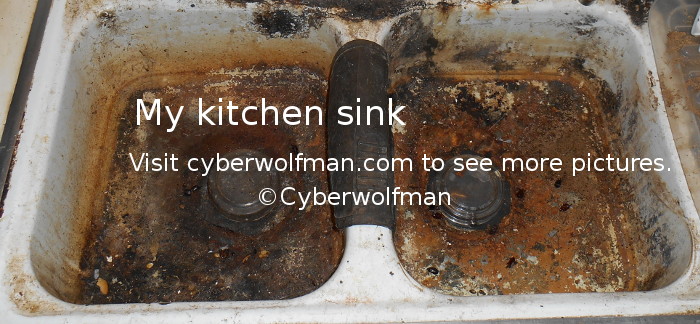
* If I was allowed a 3rd thing, it would be a new kitchen sink.
* So many people want riches and power, but me? I just want to be able to read without pain, have shoes that I can wear that don't hurt and have a kitchen sink I can use! LOL
* Although, technically, not a luxury, another thing I'd add to my silly (and impossible for me to get) wish list is about as far out of my budget as the moon AKA Luna. If I was one of the super-rich who had thousands of dollars to spare, I'd like a new septic drain field and maybe a new septic tank and system. It'd be nice to take a quick shower without water backing up out of the drain, covering my feet.
One of the events I went to was the Florida Renaissance Festival, on March 7th, 2015. It was a little too warm and humid for my taste, so, I wasn't thinking too clearly for most of it, but, I tried to catch some of the acts while enjoying the sweet cider there, but, truth be told, I would have rather had the blueberry beer they served at the Camelot Days Medieval Festival at Topeekeegee Park (AKA TY Park) in Hollywood, Florida.
Another time I went to the Florida Renaissance Festival was on February 8th, 2014, where I met people like Garrett, Steve and Wiz, among many others. While there, I saw acts such as Craic, MooNIE the Magnificent, Celtic Mayhem, Broon, Limey Birds, the Duelists, Trash or Treasure, and Wolgemut. Each of these acts are different, but, they are all entertaining.
Some of the more frequently visited pages that people are looking for here are either listed in the upper left hand corner of this page, or in the featured pages on the right. Quick tip: Click on a Web page's background (at least on my site, it's safe to do so, but, you might get a pop-up ad on other sites) and hit the Home key on your keyboard to go to the top of the page. The rest are on the Site Map page where almost all of my Web pages are arranged in alphabetical order.
You are very welcome. :-)
It may be time for me to give up . . .
After years of trying, of spending so much of my spare time and money in an attempt to make the world a better place, the world and the people in it only seem to get worse. My struggles have left me very tired, weak, frustrated, and, if I was being honest, few would miss me if I was gone. But, I never fit in, anyway . . .
Warning: While I've told a few people about this, already, and tried to warn people about it on different parts of my Web site, there will be increased violence, soon (yes, more). Some of the mass shootings will be done by lone gunmen, while others will be committed by groups of three or more.
Some of the mass shootings sites will be at schools, where the shooter(s) either suffered physical and/or emotional abuse (see my School Violence: What Causes School Violence page for details about that sort of thing, which I started decades ago and gave up on updating it since nobody was listening), doesn't like the skin colour and/or religion of those who attend those schools or they just want easy targets AKA soft targets. Some sites of mass shooting will be parties or bars where loud music is playing. Other sites will be places of work or worship. There will also be mass shootings at stores, both well-known and locally-owned grocery stores. In the latter cases (the places of worship like churches or stores), the shooter(s) chose these sites because those in the neighbourhood were of a specific skin colour and/or religion and were very easy targets, usually only with a security officer or off-duty or retired police officer providing security who was easy to spot.
Of course, those I told about this rolled their eyes at me or judged me solely on my appearance (one was a security officer at a Florida Publix grocery store), but, that always happens. However, when I have to choose between warning people of dangers, like I've done often in the past and getting the usual response or waiting until these things happen, I'll almost always choose the former and not the latter. I've had a Cassandra complex for years!
Right. I said 'almost' didn't I? Well, you'll figure it out, soon enough. After all, some things just aren't believed without enough proof, and, if it sounds too strange, you'll likely be locked up somewhere for 'observation' and if it happens shortly after you tell them about it you'll be arrested, interrogated and probably locked up. And, seriously, when it comes to karma, I'm doing far more for others than people have done for me. Or, at least I'm trying to . . . It's really not my fault when people don't listen.
Choose Your Entrance
☛ For a more complete list, please try the Site Map page, or the Main page, which doesn't list all the pages, but, is more interesting to look at than the Site Map page which is almost all links.
Pictures pages (more on the Site Map page)
Cyberwolfman's Pix #3. Pictures taken in the ActiveWorlds 3D chat program.
Cyberwolfman's Pix #4. Back to the real world. Includes Halloween pictures, party pictures, more pictures of Bloomington-Normal Illinois including events, people, and theaters.
Cyberwolfman's Pix #5. Pictures of fountains, buildings, and people, including some radio D.J.s.
Cyberwolfman's Pix #6. More pictures of Bloomington-Normal Illinois, including a multiple-car accident, skateboarders in a parking garage, pictures of the inside of the nearly totally abandoned College Hills Mall and a picture of the Miller Park lake showing it almost perfectly still and mirror-like.
My next pictures page should include pictures taken in south Florida.
Search this site:
To search this Web site: Most newer Web browsers such as the TOR Browser (for some privacy, but, that's definitely not guaranteed and don't log in anywhere with it and it won't work with some sites) or Firefox come with a search engine box next to the address bar, or allow you to search from the address bar itself in Web browsers like Chromium (the open source Web browser that Google Chrome gets its source code from, but, un-like Google Chrome, it does not (at the time of this writing) contain rlz tracking). If you are looking for something on my Web site, simply make certain that search box AKA field is clear, type the word that you are trying to find, and, after a single space, add "site:cyberwolfman.com" (without the quotes) at the end. If you are looking for a phrase, put a quote mark (yes, now it's okay to use the quotes. Hee hee hee) on each end of the phrase, first, then, a space, and type in site:cyberwolfman.com and hit the Enter key.
When you get to the Web page, use the Ctrl+f key combination to search for what you're looking for on that page, to save yourself some reading time.
Congratulations! You have learned a couple of new tricks today (if you didn't know them, already), and you can now find what you want on the Web faster, which means you have more time to spend on other things, and you won't get frustrated by looking through countless Web pages for what you want, and, in a fit of rage, shove your keyboard through the monitor, or throw your smart device in the lake and count how many times it skips.
You are very welcome. If you appreciate this kind of thing, please consider donating a single dollar to help keep this Web site running, and encourage me to do more by going to the Help Cyberwolfman page, where you can also learn how you can help people the world over for free! :-)